ShipMyCar MCP Quote Guide
ShipMyCar's AI quote connector lets assistants such as Claude, Codex and ChatGPT collect vehicle and route details in a normal conversation, ask for anything missing, and return a quote with a link to continue. The supported scope is UK-to-UK transport and imports to the UK from Europe and overseas, including transport and HMRC estimates. The assistant checks live route availability first.
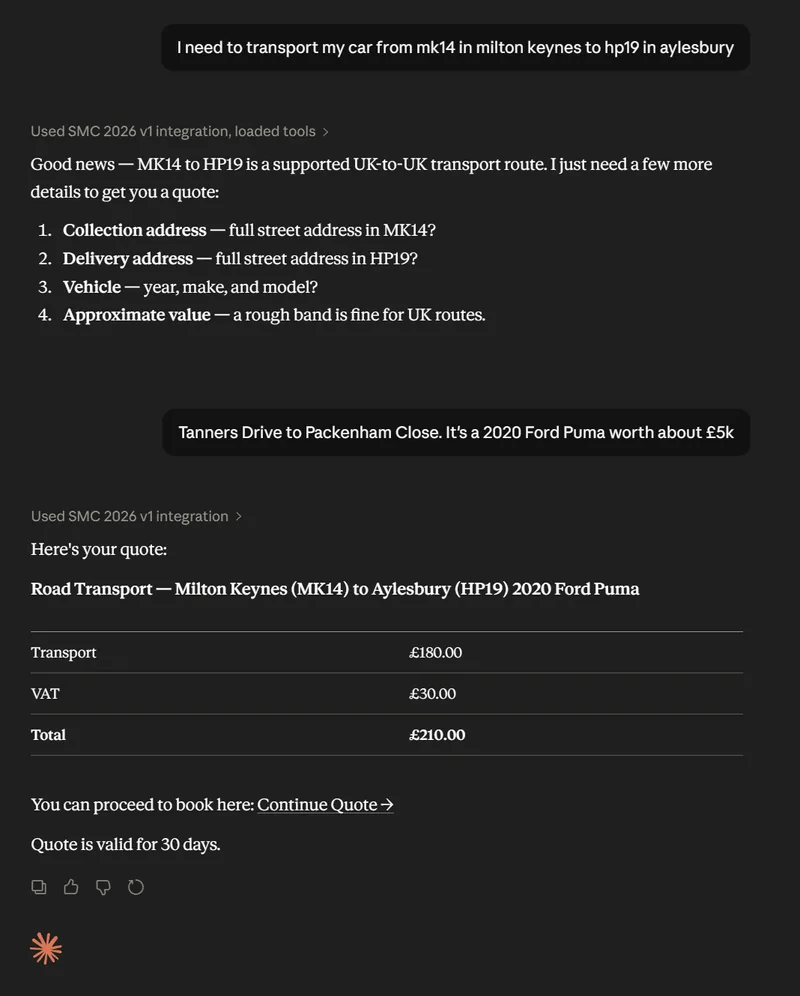
Ask in plain English
You
I need a quote to move a 2020 Ford Mustang from Tring to Milton Keynes.
AI assistant
I can help. What is the collection address, delivery postcode and rough vehicle value?
ShipMyCar connector
Returns the quote, key details and a link to continue on ShipMyCar.
Who it is useful for
It is for anyone who wants to turn a vehicle transport question into a clear next step without copying details between different systems.
Car buyers
Ask an AI assistant for a transport estimate while you are looking at a vehicle, advert or auction lot.
Dealers and marketplaces
Help buyers understand the likely delivery cost before they enquire or commit to a purchase.
Support and relocation teams
Collect the right transport details in a normal conversation and hand customers to ShipMyCar when ready.
A quote conversation that actually gets to a quote
The connector listens for the details ShipMyCar needs, asks for anything missing, and gives the AI assistant a structured answer it can explain clearly.
Collects quote details
It can ask for the collection place, delivery place, vehicle details, value and anything else needed.
Estimates transport and HMRC
For enabled UK import routes, it estimates transport and HMRC costs. UK-to-UK quotes cover transport.
Gives a continuation link
The customer can open the quote on ShipMyCar to check the details and continue from there.
Checks service availability
The connector supports UK transport and imports to the UK from Europe and overseas. The assistant checks which routes are live before quoting.
Connect your AI assistant
MCP is a standard way for an AI assistant to use tools from a website. In this case, the tool is ShipMyCar quoting. Use the same public connector URL with each supported client.
Claude
- 1
In Claude, open Customize, then Connectors. Choose + Add, then Add custom connector.
- 2
Use ShipMyCar as the name, paste in the connector URL and choose Continue.
- 3
Review the detected settings and select No sign in. This public connector needs no OAuth client or API key.
- 4
Finish adding the connector, then enable it from the + menu in your conversation.
- 5
Ask for UK transport or a vehicle import to the UK. The assistant checks availability, collects missing details and asks before generating it.
Team and Enterprise workspaces may need an owner to add the connector first. See the official Claude setup guide.
Connector URL
https://www.shipmycar.co.uk/mcp
Use this URL when your AI app asks for the MCP server or connector address.
Select Streamable HTTP if a transport is requested, and No sign in or no authentication if an authentication choice is shown. No API key or OAuth client is required.
Claude Code
Add the remote HTTP server from your terminal, then use /mcp in Claude Code to check the connection.
claude mcp add --transport http shipmycar https://www.shipmycar.co.uk/mcpCodex
Open Settings, then MCP servers, choose Add server and select Streamable HTTP. Paste the URL, save and restart. You can also add this to your Codex config.toml:
[mcp_servers.shipmycar]
url = "https://www.shipmycar.co.uk/mcp"ChatGPT
Open Plugins, select the + button, then Add custom MCP server. Enter the connector URL, choose no authentication, review the connection and select Create as a plugin. Enable the resulting plugin in your chat.
Custom connections depend on your account and workspace settings. A directory listing does not install the connector in ChatGPT.
Official OpenAI plugin setupStart with a normal transport question
You do not need to format it like an API request. Write the way a customer would ask for help.
For a UK import, supply the vehicle year, make, model, actual value and currency. The assistant also asks about the import duration, reason, personal or commercial purpose, registration country and relevant origin or customs relief details. A UK transport value band is not enough for an import.
Example prompt
"I need a quote to transport a 2020 Ford Mustang from High Street, Tring to MK14 5BN. It is worth about £20,000."
If something is missing, the assistant should ask a follow-up question before trying to generate the quote.
Good to know
The connector is designed for clear lead generation first. It helps produce a quote and a next step, without forcing every customer into a full checkout flow.
The connector does not email quotes automatically.
It returns quote details and a link to continue on ShipMyCar.
UK-to-UK transport and UK imports are the supported scope. Ask the assistant to check which routes are currently enabled.
UK import estimates cover transport and HMRC only. DVLA registration, IVA/approval and vehicle modifications need a separate follow-up.
Vehicle details are supplied manually. VIN lookups and exports are disabled.
Quote generation needs your confirmation. Contact details are stored in the continuation payload only with your consent.